

Smart office technology is the network of connected devices, sensors, and software platforms that automate and personalise how a workplace runs, from desk booking to lighting to security. The biggest payoff isn’t the gadgets themselves. It’s the data they generate, which lets decision-makers cut wasted space, trim energy bills, and give hybrid staff a reason to actually come in. Get the platform layer right and the rest follows.
TL;DR:
- Accurate planning requires a small pilot with clear success criteria, proper stakeholder input, and careful integration testing before broad deployment.
- Connectivity depends on reliable Wi-Fi 6 or 7 infrastructure, with edge or cloud processing decisions based on latency and data type.
- Optimizing ROI involves tracking occupancy rates, booking success, energy use, and employee satisfaction through consistent, regular metrics.
- Security gaps often arise from poor network segmentation, unpatched devices, and unclear data governance, requiring explicit controls and transparency.
- Workspace design must align with sensor placement and automation strategies by considering acoustic zones, circulation paths, and amenity locations from the start.
Table of Contents
- What does smart office technology actually include?
- How do IoT, AI, and platforms work together in a smart office?
- What are the real business benefits of a smart office?
- How do you plan and implement smart office technology?
- What integration and security issues catch teams out?
- How do you measure smart office ROI?
- How does workplace design shape which smart office tech actually works?
- Ready to bring smart office technology into your workplace?
- Sources
What does smart office technology actually include?
The phrase gets thrown around loosely, so it’s worth being precise. A smart office links connected devices, sensors, and cloud platforms into one system that tracks occupancy, adjusts environmental conditions, and generates the kind of analytics you’d normally have to guess at. Cisco frames this as the integration point between hardware and software that enables wayfinding, occupancy monitoring, and reporting from a single dashboard rather than a dozen disconnected apps.
In practice, most projects end up commissioning some combination of the following:
- Connectivity infrastructure, usually enterprise Wi-Fi and sometimes private 5G, to carry sensor and device traffic reliably.
- Occupancy and environmental sensors that track desk use, air quality, and room conditions in real time.
- IWMS or CAFM platforms (integrated workplace management systems) that centralise space data, maintenance requests, and asset records.
- Desk and room booking systems tied to occupancy sensors so bookings reflect actual use, not guesswork.
- HVAC and lighting controls that respond to occupancy and daylight rather than running on fixed schedules.
- Access control and visitor management for security and compliance.
- Collaboration tools, from video conferencing to interactive displays in meeting spaces.
- Automation platforms that stitch all of the above into workflows instead of leaving them as isolated point solutions.
IBM’s rundown of smart office elements puts smart lighting, thermostats, desks, and conference rooms at the centre of most deployments, and that matches what most Australian fit-out briefs ask for first. Each component solves a specific workplace complaint: staff can’t find a free desk, meeting rooms sit empty on the calendar but full in reality, or the air conditioning runs at full bore in an unoccupied wing. Match the technology to the actual complaint, not the vendor’s feature list.
How do IoT, AI, and platforms work together in a smart office?
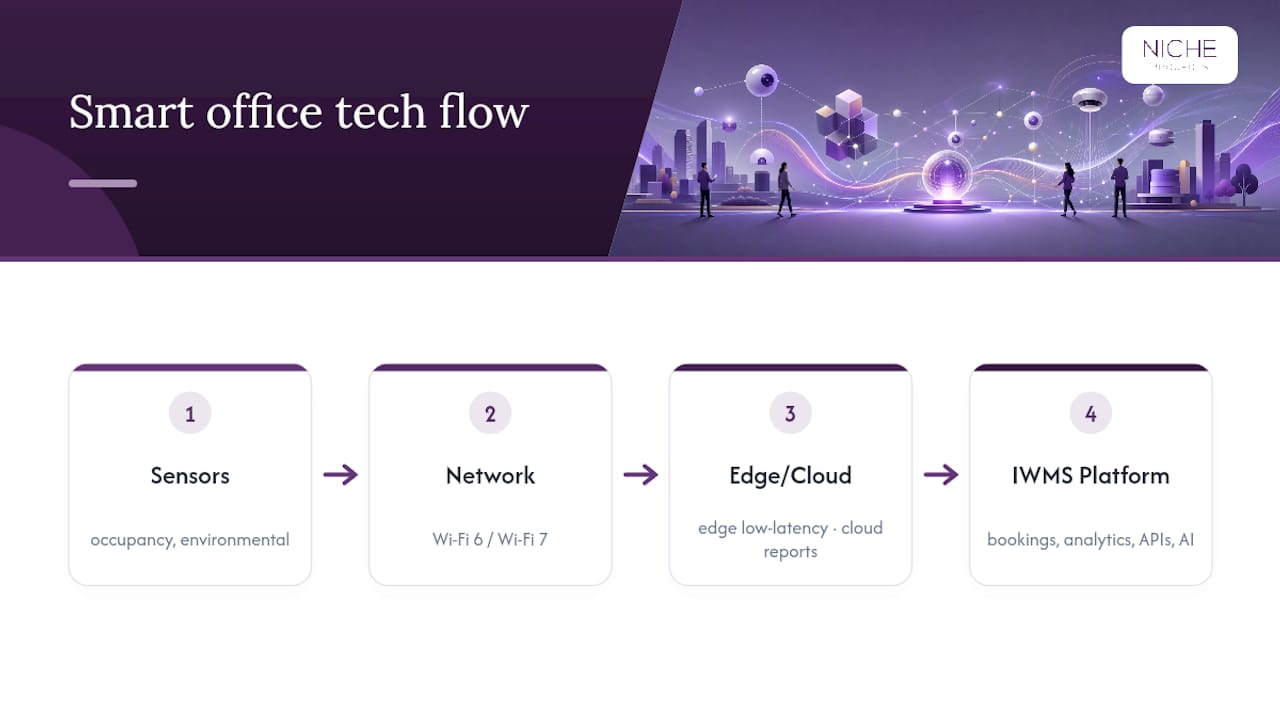
The individual pieces of smart office technology are unremarkable on their own. A single occupancy sensor tells you one thing: is this desk in use right now? The value shows up when dozens of sensors feed one platform that turns raw signals into decisions.
Sensors and what they actually measure. Occupancy sensors typically use passive infrared, ultrasonic, or a mix of both to detect whether a desk or room is in use. Placement matters more than most buyers expect. Mount a sensor too close to a walkway and it will register false positives all day; put it above a partition and it might miss someone sitting low at a standing desk. Environmental sensors measuring CO2, temperature, and humidity need calibration checks every few months, because drift is common in cheaper units.
Networking underneath it all. Hundreds of sensors reporting every few seconds create real network load. Wi-Fi 6 (and increasingly Wi-Fi 7) handles this far better than older standards because of improved device density handling, but the bigger decision is edge versus cloud processing. Edge computing keeps latency low for things like automated door access; cloud platforms suit slower-moving data like weekly utilisation reports.
The platform layer. This is where IWMS and workplace management tools earn their cost. Deskbird’s take on workplace platforms is that they function as a control centre, pulling booking data, sensor feeds, and analytics into one place rather than leaving facilities teams to reconcile five separate systems by hand.
AI and automation use cases tend to cluster around three areas: predictive maintenance (flagging an HVAC unit before it fails, not after), automated room release (freeing a booked-but-unused meeting room after ten minutes), and energy optimisation based on real occupancy patterns rather than fixed timers.
Integration happens through APIs and, increasingly, low-code automation tools. Microsoft Power Automate connects to more than 1,400 services, which is why it’s become a common glue layer between sensor platforms, booking systems, and reporting tools like Power BI.
Pro Tip: Ask any vendor for their API documentation before you sign anything. If they can’t produce it on request, assume integration will be a manual, ongoing headache rather than a one-off setup task.
What are the real business benefits of a smart office?
The productivity case for smart office technology isn’t theoretical. It shows up in specific, measurable changes to how space and energy get used.
- Desk and meeting-room efficiency. Booking systems paired with occupancy sensors stop the common problem of rooms showing “booked” on a calendar while sitting empty in reality. Wayfinding tools then help staff and visitors find available space fast, which matters more in larger or multi-floor offices.
- Space rationalisation and cost savings. Occupancy data reveals which zones get used and which don’t. Organisations that act on this data commonly discover they’re paying for more floor space than their actual attendance patterns justify, and can consolidate or sublease accordingly.
- Security and safety. Access control paired with visitor management systems gives facilities teams a real-time picture of who’s in the building, which matters for compliance and emergency response alike.
- Sustainability and energy reporting. Smart HVAC and lighting controls that respond to occupancy, rather than running on a fixed timer, cut energy waste directly. That data also feeds carbon reporting requirements that more companies now face from investors or regulators.
- Employee experience. None of the above lands well if staff find the tech intrusive. The offices that get this right treat automation as something that removes friction (finding a desk, booking a room, adjusting the temperature) rather than something that watches people.
How do you plan and implement smart office technology?
Most failed smart office projects don’t fail because of bad hardware. They fail because nobody scoped the pilot properly or nobody trained staff on why any of it mattered. A structured roadmap avoids both traps.
- Audit the current state. Walk the floor, interview facilities, HR, and IT stakeholders, and identify where the real pain points sit, whether that’s desk shortages, energy waste, or meeting-room chaos.
- Define a tightly scoped pilot. Avigilon’s guidance on smart office roll-outs is blunt about this: start small, with measurable success criteria, rather than deploying across an entire building at once.
- Choose your procurement approach. An integrated platform (one vendor, one contract) suits organisations that want simplicity and are prepared to accept some vendor lock-in. A best-of-breed approach (specialist tools stitched together) suits organisations with existing systems they don’t want to rip out, but it demands stronger internal integration capability.
- Run the pilot with a fixed timeframe. Collect data over a defined window, usually eight to twelve weeks, long enough to smooth out novelty effects but short enough to keep momentum.
- Evaluate against your original success criteria, not against how impressive the technology feels in a demo.
- Scale up with governance in place, including clear data ownership, a change management plan, and staff training before wider rollout.
Before locking in a budget, work through this checklist:
- Confirm integration requirements with existing building management systems (BMS) upfront, not after signing.
- Separate one-off costs (sensors, hardware, cabling) from recurring costs (licences, managed services, support).
- Build in a contingency for electrical and network infrastructure work, which fit-out budgets routinely underestimate. A commercial electrical fit-out specialist can scope this accurately before construction starts.
- Involve change management early rather than treating training as a launch-week afterthought.
- Set a review date for six months post-launch to catch scope creep or underused features.
What integration and security issues catch teams out?
The most common integration failure isn’t a dramatic one. It’s a legacy building management system that simply won’t talk to a new sensor platform without a costly middleware layer, discovered halfway through a project rather than during scoping. Industry analysis on collaboration technology makes a similar point about tool sprawl generally: pick systems that match how your organisation already works, rather than forcing staff to adapt to five disconnected platforms.
Security deserves equal weight to functionality, not an afterthought bolted on before go-live.
- Network segmentation. IoT devices should sit on a separate network segment from core business systems, so a compromised sensor can’t become a route into finance or HR data.
- Device lifecycle management. Someone needs ownership of firmware updates and end-of-life replacement, because unpatched sensors are a genuine vulnerability.
- Identity and access controls. Anyone who can view or export occupancy data should be defined explicitly, not left to default admin settings.
- Data governance. Decide what you’re collecting, anonymise where individual identification isn’t necessary, and set clear retention periods.
- Employee transparency. Staff should know what’s being monitored and why. Occupancy data framed as “we’re optimising space” lands very differently to data that feels like surveillance.
Pro Tip: Put data retention and anonymisation terms in the vendor contract itself, not just in an internal policy document. Policies get forgotten; contracts get enforced.
How do you measure smart office ROI?
The metrics that convince a CFO differ from the ones that convince an employee, and a good measurement plan tracks both.
Leading indicators worth watching from week one include:
- Desk and room occupancy rates against booked rates
- Booking success rate (how often a booked desk or room was actually available and used)
- Mean time to resolve maintenance requests raised through the platform
Lagging indicators, tracked monthly or quarterly, include energy consumption per square metre, cost per workstation, and employee satisfaction scores gathered through short pulse surveys.
A basic ROI model starts with your current real estate and energy spend, then models the space and energy reduction a pilot demonstrates. Deskbird’s own data suggests that pairing utilisation, booking friction, and energy metrics together builds a stronger business case with finance stakeholders than wellbeing metrics alone, mostly because the numbers are harder to argue with.
Report against these metrics monthly during the pilot phase, then quarterly once the system is embedded, using a simple dashboard rather than a lengthy written report nobody reads.
How does workplace design shape which smart office tech actually works?
Technology choices don’t happen in a vacuum. Acoustic zoning, circulation paths, and where you place amenities all determine which sensors work and where they should sit, which is why Design and technology planning are treated as parallel workstreams from day one rather than sequencing one after the other.
Design decisions that get made without technology input tend to create rework: a beautifully zoned collaboration hub with no thought given to occupancy sensor placement, or a meeting room retrofit that ignores the AV and booking integration needed to make it useful. Getting the circulation and layout right first means the sensor and automation layer slots in without a second fit-out pass.
- Acoustic zoning affects where noise sensors and meeting pods need reinforced walls, not just carpet tiles.
- Circulation paths determine where wayfinding and occupancy sensors deliver the most value.
- Amenity placement (kitchens, breakout zones, quiet rooms) shapes which spaces actually need smart booking versus open access.
Ready to bring smart office technology into your workplace?
Reading about occupancy sensors and IWMS platforms is one thing. Commissioning a project that actually fits your floor plate, your budget, and your staff is another, and that gap is exactly where most smart office projects stall before they start. Workplace strategy through to design and construction services integrate the technology conversation alongside decisions about layout, acoustics, and collaboration zones, rather than as a bolt-on afterwards.
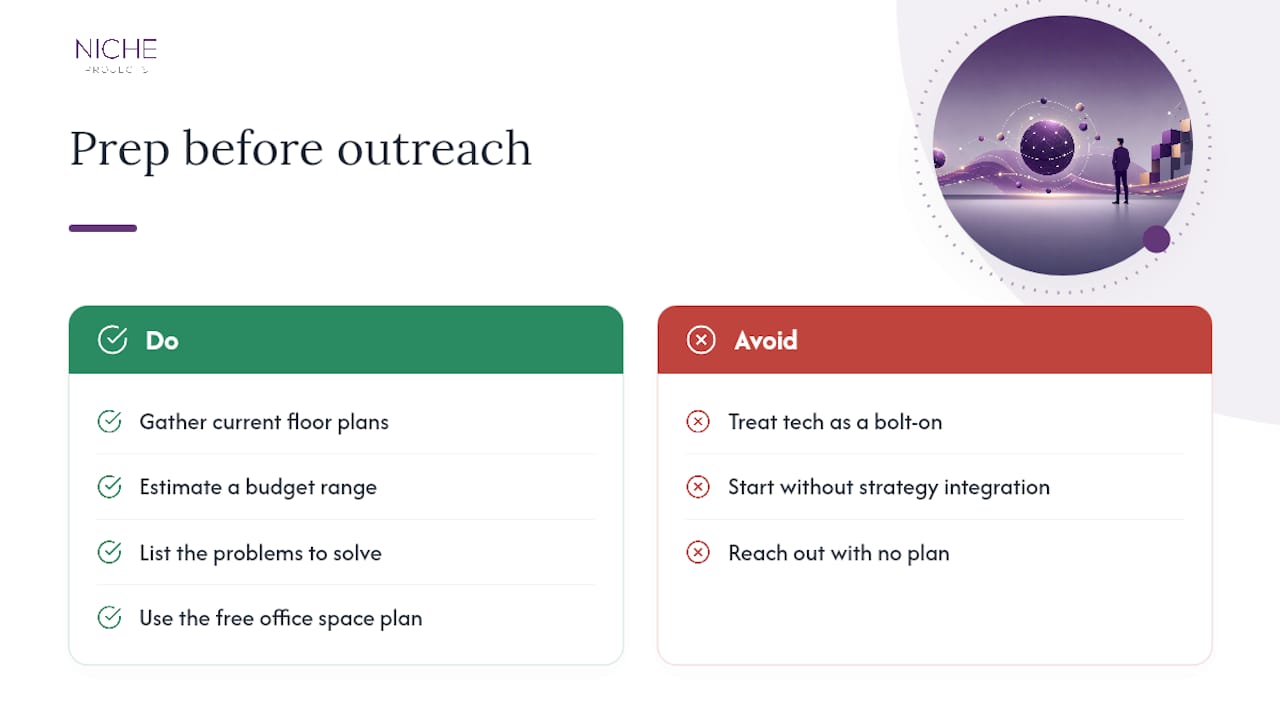
Before reaching out, pull together your current floor plans, a rough sense of your budget range, and a short list of the problems you’re actually trying to solve, whether that’s wasted space, energy costs, or a hybrid workforce that never knows where to sit. If you want a starting point with no commitment attached, the free office space plan is a practical way to see what a tailored layout looks like before you scope the technology stack around it.
Sources
- What Is Smart Office Technology? Tools, Features, & Benefits — Cisco Spaces
- What is a smart office? — IBM
- How workplace technology is transforming work — deskbird
- Smart Office Technology & Office Automation Guide + PDF — Avigilon