

There is no single mandatory “office ergonomics standard”. Work health and safety (WHS) duties and the model Code of Practice set the legal obligations, while AS/NZS standards give you technical benchmarks to write into specifications and purchase orders. The practical answer for anyone responsible for office health and safety is to treat these as two layers: comply with the legal duty, then use the standards to make procurement decisions objective and testable.
TL;DR:
- Employers must proactively identify and manage musculoskeletal risks in the office, focusing on hazards like repetitive tasks and awkward postures, not just furniture choices.
- AS/NZS 4442:2018 and AS/NZS 4438:1997 set voluntary but enforceable standards for desks and chairs, becoming contractual when cited in procurement documents.
- Proper workstation setup involves monitor height at eye level, adjustable seating with correct knee and elbow angles, and external peripherals for laptop users.
- Continuous systems-based management, including staff involvement and early discomfort reporting, is essential to prevent long-term injuries and ensure ergonomic compliance.
- Embedding ergonomic requirements into policies, design plans, and procurement processes from the start avoids retrofitting costs and helps create a healthier, productive office environment.
Table of Contents
- What governs office ergonomics: WHS duties and the Safe Work Australia code
- Australian technical standards you can reference in specifications
- Setting up the workstation: monitor, chair, desk and peripherals
- Building a systems approach to ergonomic risk management
- Turning standards into procurement and tender requirements
- Breaks, eye health and the 20/20/20 rule
- Measuring and assessing whether a workstation actually complies
- Training staff and managers on ergonomics
- Recognising the early signs of ergonomic-related health issues
- Making ergonomics part of policy, not a one-off project
- Where ergonomics fits into an office design project
- Sources
- FAQ
What governs office ergonomics: WHS duties and the Safe Work Australia code
Every employer carries a duty to eliminate or minimise musculoskeletal disorder (MSD) risk so far as reasonably practicable. That duty does not name a specific chair height or monitor distance: it requires a process of identifying hazards, assessing risk and choosing controls.
The model Code of Practice: Hazardous Manual Tasks is the primary compliance document behind that process. It sets out how to spot hazardous manual tasks, assess the risk of injury and select controls, and its principles apply directly to prolonged sitting, repetitive keyboard work and awkward postures at a desk, not just lifting and handling in a warehouse.
State regulators build on this with office-specific detail. WorkSafe Victoria’s office layout and design guidance translates the same duties into practical advice on adjustable chairs, monitor placement and workstation angles.
- Employers must eliminate or minimise MSD risk as far as reasonably practicable, not just supply generic furniture.
- The model Code of Practice explains how to identify, assess and control musculoskeletal risk in everyday office tasks.
- State WorkSafe pages add local, office-specific examples that sit underneath the same national duty.
Australian technical standards you can reference in specifications
WHS law tells you what outcome to achieve. Australian Standards tell you how to describe that outcome in a way a supplier can test against. Two standards do most of the work in an office fit-out.
AS/NZS 4442:2018 covers office desks, workstations and tables: mechanical and dimensional requirements, stability under load and the test methods manufacturers use to prove compliance. AS/NZS 4438:1997 covers height-adjustable swivel chairs, setting functional and strength requirements so a chair sold as “ergonomic” actually holds up under sustained daily use.
Neither standard is mandatory law in the way a WHS duty is. They are voluntary technical benchmarks, but once you cite them in a tender or purchase order they become enforceable contract terms.
- AS/NZS 4442:2018 sets dimensional, stability and test requirements for desks, worktops and workstations.
- AS/NZS 4438:1997 sets functional and strength testing requirements for height-adjustable swivel chairs.
- Citing both standards in procurement documents turns a vague “ergonomic furniture” request into an objective, testable requirement.
Setting up the workstation: monitor, chair, desk and peripherals
Most day-to-day ergonomic risk in an office comes down to four things a worker adjusts, or fails to adjust, every day. WorkSafe Queensland’s workstation guidance and the Monash University Office Ergonomics Guidelines both set out the same core setup, useful as a checklist for inductions or self-assessment forms.
- Position the monitor at roughly arm’s length, with the top of the screen at or slightly below eye level, so the neck stays in a neutral position rather than tilting up or down.
- Set seat height so knees sit at roughly a right angle with feet flat on the floor or on a footrest, then adjust lumbar support to fill the curve of the lower back.
- Keep elbows close to the body at around 90 to 110 degrees, wrists straight, and use a keyboard and mouse placed at the same height so the shoulders stay relaxed rather than hunched.
- Choose a chair with a five-point base and working casters or gliders appropriate to the floor surface, and check seat depth leaves two to three finger-widths between the seat edge and the back of the knee.
- For laptop users, add an external keyboard, mouse and a separate monitor or laptop riser rather than working from the built-in screen and keys for extended periods.
- Where the desk is a sit-stand model, check it covers both seated and standing height ranges comfortably and leaves enough clearance and worktop depth for multi-monitor arrangements.
Pro Tip: Adjust the chair before the desk. A correctly set chair height determines the right desk and monitor height, not the other way around.
Building a systems approach to ergonomic risk management
Buying better chairs solves nothing on its own if nobody reports discomfort until it becomes a chronic injury. The ErgoLink summary of WHS requirements points to a systems approach: management commitment, worker involvement, early reporting and continuous evaluation matter more than the equipment budget alone.
That means embedding ergonomics into the same hazard identification, risk assessment and control cycle used for any other WHS risk, with workers actually consulted on what is uncomfortable in practice rather than assessed from a policy document.
- Give leadership visible ownership of ergonomic risk rather than leaving it as a facilities line item.
- Involve workers directly in hazard identification: they notice discomfort long before it shows up in incident data.
- Set a low threshold for reporting so small adjustments happen before a niggle becomes a claim.
- Escalate to an occupational health professional or ergonomist when self-adjustment and standard equipment do not resolve reported discomfort.
- Document each assessment and the control chosen, so repeat complaints trigger a review rather than another quick fix.
Turning standards into procurement and tender requirements
Standards only protect your organisation if they appear in the paperwork before furniture arrives, not after someone complains. When issuing a tender or purchase order, ask suppliers directly which AS/NZS standards their products are tested against and request the certification or test evidence, rather than accepting a marketing claim of “ergonomic”.
Write measurable ranges into the specification: seat height adjustment range, seat depth adjustment, worktop height for both seated and standing use, and monitor riser heights, referencing AS/NZS 4442:2018 for desks and AS/NZS 4438:1997 for chairs. Facility planners also need to check floor space allowances early, since CNC floor space planning guidance suggests budgeting closer to 1.4 times the vendor’s stated footprint once clearance and cabling are accounted for.
- Request written evidence that furniture meets the relevant AS/NZS standard, not just a supplier’s own description.
- Specify adjustment ranges and durability testing in the tender, not just finish and colour.
- Build in a trial period with real users, including accessibility and neurodiversity needs, before signing off on a bulk order.
Pro Tip: A short user trial with five or six staff of different heights catches fit problems that a showroom demo never will.
Breaks, eye health and the 20/20/20 rule
Static posture and screen fatigue cause as much discomfort as a poorly set chair. The 20/20/20 rule is simple: every 20 minutes, look at something roughly 20 feet away for at least 20 seconds, which gives the eye muscles a break from close-range focus. A calendar prompt or a screen-break app nudge is usually enough to build the habit.
- Stand and stretch the shoulders and neck for 30 seconds every half hour.
- Roll the wrists and stretch the forearms between typing tasks.
- Stand up during phone calls where practical instead of sitting through the whole conversation.
- Alternate sitting and standing through the day rather than locking into one position for hours.
- Use a footrest or anti-fatigue mat when standing for extended periods on a hard floor.
Measuring and assessing whether a workstation actually complies
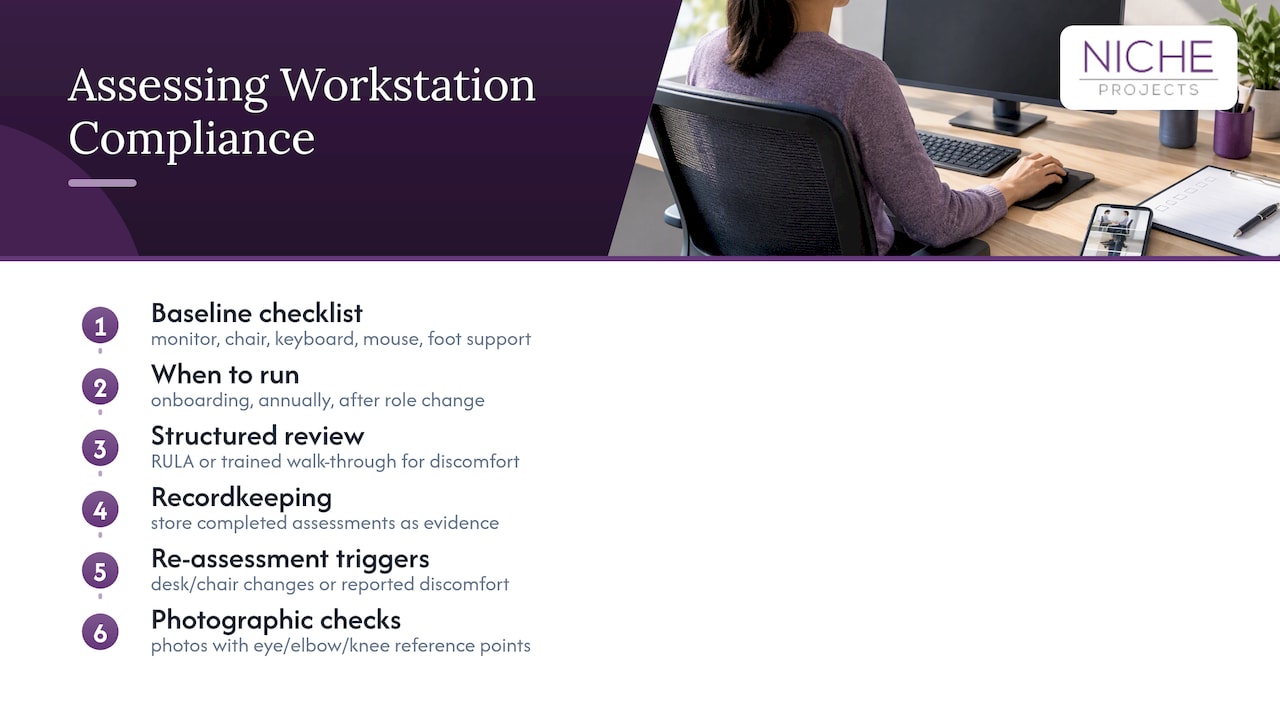
A policy that says workstations must be “ergonomic” is unenforceable without a way to check it. Most workplaces rely on a simple self-assessment checklist covering monitor height, chair adjustment, keyboard and mouse position and foot support, filled out during onboarding and revisited annually or after a role change.
For a more structured review, a rapid upper limb assessment or a walk-through observation by a trained assessor adds detail a checklist misses, particularly for workers reporting ongoing discomfort. The Monash University guidelines set out a worked example of this kind of institutional self-assessment process, useful as a template for other workplaces building their own.
Whichever method you use, treat the checklist as evidence, not paperwork. Keep completed assessments on file and re-run them whenever a workstation changes, a new chair or desk is issued, or a worker reports discomfort. A pattern of repeated complaints from the same desk location, rather than the same person, usually points to an equipment or layout fault worth investigating separately.
Photographs taken during a self-assessment, checked against the same reference points (eye level, elbow angle, knee angle), give a reviewer something concrete to compare over time rather than relying on a worker’s own description of “feeling fine”.
Training staff and managers on ergonomics
A workstation set up correctly on day one drifts within weeks if nobody explains why the settings matter. Induction training should cover the basics: how to adjust a chair, where the monitor should sit, and why wrist position matters, backed by a short demonstration rather than a slide deck alone.
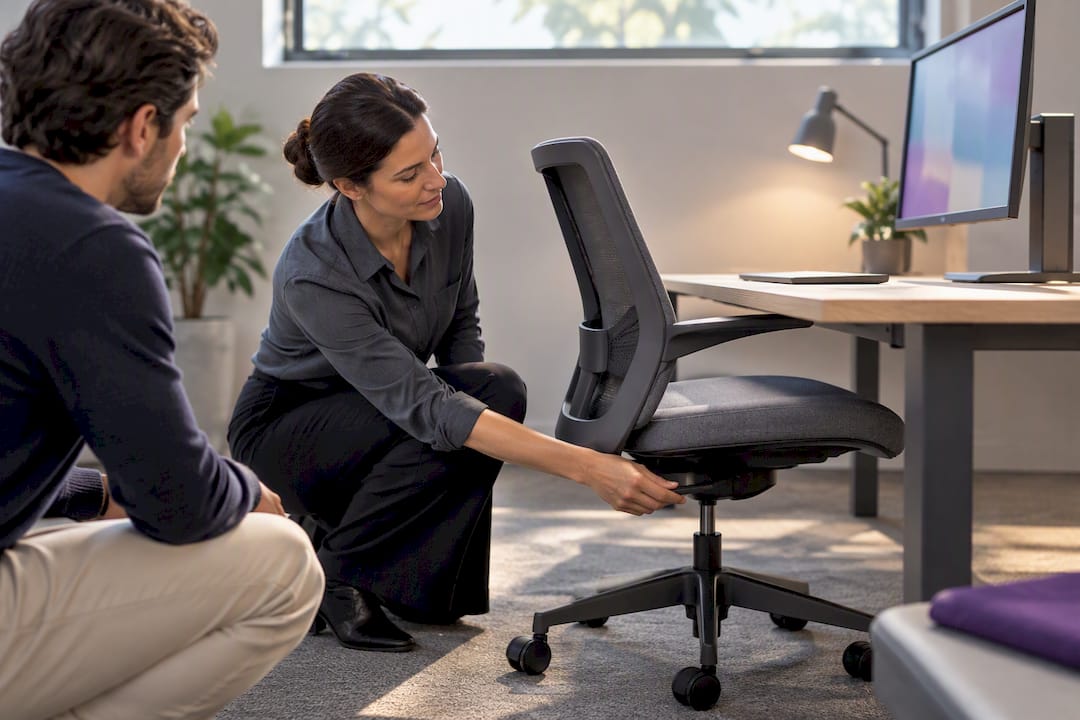
Managers need a different layer of training: recognising early signs of discomfort in their team, knowing the reporting pathway, and understanding that a complaint about a “stiff neck” is a WHS matter, not a minor gripe to wait out. Facilities and HR staff involved in procurement benefit from a working knowledge of the AS/NZS standards referenced earlier, enough to read a supplier’s compliance certificate and know what it actually covers.
Refresher training pays off most after a fit-out, a desk reshuffle or a shift to new furniture, since habits formed on old equipment do not automatically transfer to a sit-stand desk or a new chair with different controls.
Recognising the early signs of ergonomic-related health issues
Office ergonomic risk shows up as musculoskeletal discomfort long before it becomes a diagnosed injury. Common early signs include neck and shoulder tightness after a normal working day, wrist or forearm discomfort associated with typing and mouse use, lower back pain that eases on standing, and eye strain or headaches toward the end of a screen-heavy day.
Left unaddressed, these can progress into conditions such as tendinitis, carpal tunnel syndrome or chronic lower back pain, all of which are harder and slower to resolve than the discomfort that preceded them. The model Code of Practice frames this as a core reason early reporting matters: intervening at the tightness stage is a chair adjustment, while intervening at the diagnosed injury stage is a workers’ compensation claim.
Encourage staff to report discomfort as soon as it appears, rather than waiting to see if it resolves on its own, and make sure managers respond with a genuine adjustment rather than dismissing the report.
Making ergonomics part of policy, not a one-off project
Ergonomics standards only protect people when they are written into the organisation’s own procedures, not treated as a one-off fit-out consideration. A workplace health and safety policy should name the model Code of Practice as its reference document, set out the self-assessment and reporting process, and specify which AS/NZS standards new furniture purchases must meet.
Procurement procedures should point back to the same standards automatically, so a new office manager three years from now does not have to rediscover which chair specification to use. Onboarding checklists, workstation review schedules and incident reporting forms all need to reference the same policy rather than each department inventing its own version.
This kind of integration also shows up in how a workplace is designed from the outset. Decisions about layout, desk spacing and office design and mental health considerations sit alongside ergonomic policy rather than separate from it, since a cramped layout undermines even well-specified furniture.
Where ergonomics fits into an office design project
Getting workstation ergonomics right is rarely just a furniture order. It is a layout decision, a procurement decision and a change management decision happening at the same time, which is where a lot of internal projects stall. Ergonomic requirements should be built into the design and fit-out process itself, so desk spacing, sit-stand allowances and monitor clearances are planned before furniture is chosen, not retrofitted afterward.
That means the AS/NZS specifications discussed above get written into the project brief from day one, and the trial period, accessibility checks and supplier evidence requirements become part of the fit-out programme rather than a separate task for whoever manages facilities. For workplaces planning a refurbishment or a full fit-out, our Sydney Office Design and Sydney Office Fitout services cover exactly this handoff between design intent and construction delivery.
If your organisation is weighing up a refurbishment against a full relocation, our workplace strategy team can walk through what an ergonomics-first brief looks like for your space and get a proposal moving.
Sources
For compliance, start with the model Code of Practice: Hazardous Manual Tasks and the Safe Work Australia workstation set-up infographic. For procurement, cite AS/NZS 4442:2018 and AS/NZS 4438:1997 directly in tenders.
- Model Code of Practice: Hazardous manual tasks (Safe Work Australia)
- AS/NZS 4442:2018 | Standards Australia Store
- Setting up your workstation (WorkSafe Queensland)
- Office Ergonomics Guidelines (Monash University)
FAQ
What are the standards for office workstations?
There is no single mandatory workstation standard: WHS duties and the model Code of Practice set the legal requirement to manage MSD risk, while AS/NZS 4442:2018 provides the technical benchmark for desks and workstations. Chairs are covered separately by AS/NZS 4438:1997.
What are the basic ergonomic principles for office work?
The core principles are neutral posture, regular posture change, adjustable equipment matched to the individual, and reducing repetitive or awkward movement. WorkSafe Queensland’s workstation guidance applies these to monitor height, keyboard position and chair adjustment specifically.
What is the 20/20/20 rule for office ergonomics?
The 20/20/20 rule is an eye health habit: every 20 minutes, look at something around 20 feet away for 20 seconds to rest the eyes from close screen focus. It is usually paired with a short posture change, such as standing or stretching, at the same interval.
What are good ergonomic practices for everyday office work?
Good practice includes setting monitor height at or slightly below eye level, keeping wrists neutral while typing, adjusting the chair before the desk, and alternating sitting and standing through the day. The Monash University Office Ergonomics Guidelines set out a practical daily routine built around these habits.
Are AS/NZS ergonomic standards legally required?
AS/NZS standards such as AS/NZS 4442:2018 and AS/NZS 4438:1997 are voluntary technical benchmarks rather than law on their own. The legal obligation comes from WHS duties and the model Code of Practice, with the standards used to make procurement specifications objective and testable.